Hello,
Thank you for your inquiry. Our team will be happy to assist you. We are processing FMLA inquiries in Edison, please see instructions below to open a FMLA case in Edison.
Step 1: Please login to Edison
Step 2: Select “Time and Leave” Header
Step 3: Select “Request FMLA/Parental Leave”.
Question
What is the second step in requesting FMLA/Parental Leave in Edison?
Answer the question above the continue reading. iTELL evaluation is based on AI and may not always be accurate.
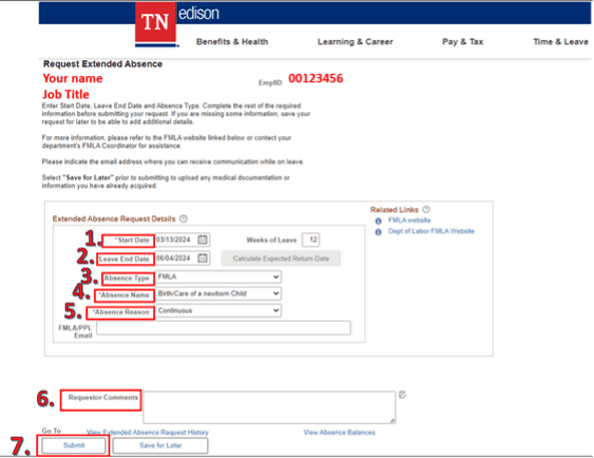
Please see instructions below when submitting a FMLA case.
Please note that if you are requesting off for “Birth/care of a newborn,” HR will check your Paid Parental Leave (PPL) eligibility and apply the coding. Do not select “TN Parental Leave.”
5. Absence Reason: Please select one.
6. Requester Comments: Please add additional comments regarding who the leave is for.
7. Click “Submit” once the page is filled out.
Last updated at